

OpenAI just announced Business Hub, a new feature that lets eligible businesses claim and manage their information in ChatGPT. It launched in beta on November 10, 2026, and if your business is eligible, we’d recommend claiming your listing sooner rather than later.
Why? ChatGPT has already been showing business information from third-party sources. Now you have an opportunity to tell it directly what your business does, which services you offer, and where people can find you.
Start here: Claim your business in ChatGPT Business Hub.
What Can You Do With Business Hub?
It’s more than just adding your business name. Once you’re verified, you can:
- Manage your business information. Confirm your website, business category, and short description (approx: 300char). Once your business claim and identity verification are approved, OpenAI says you can also manage additional profile details, including your logo and cover photo. Those options may not appear during initial registration.
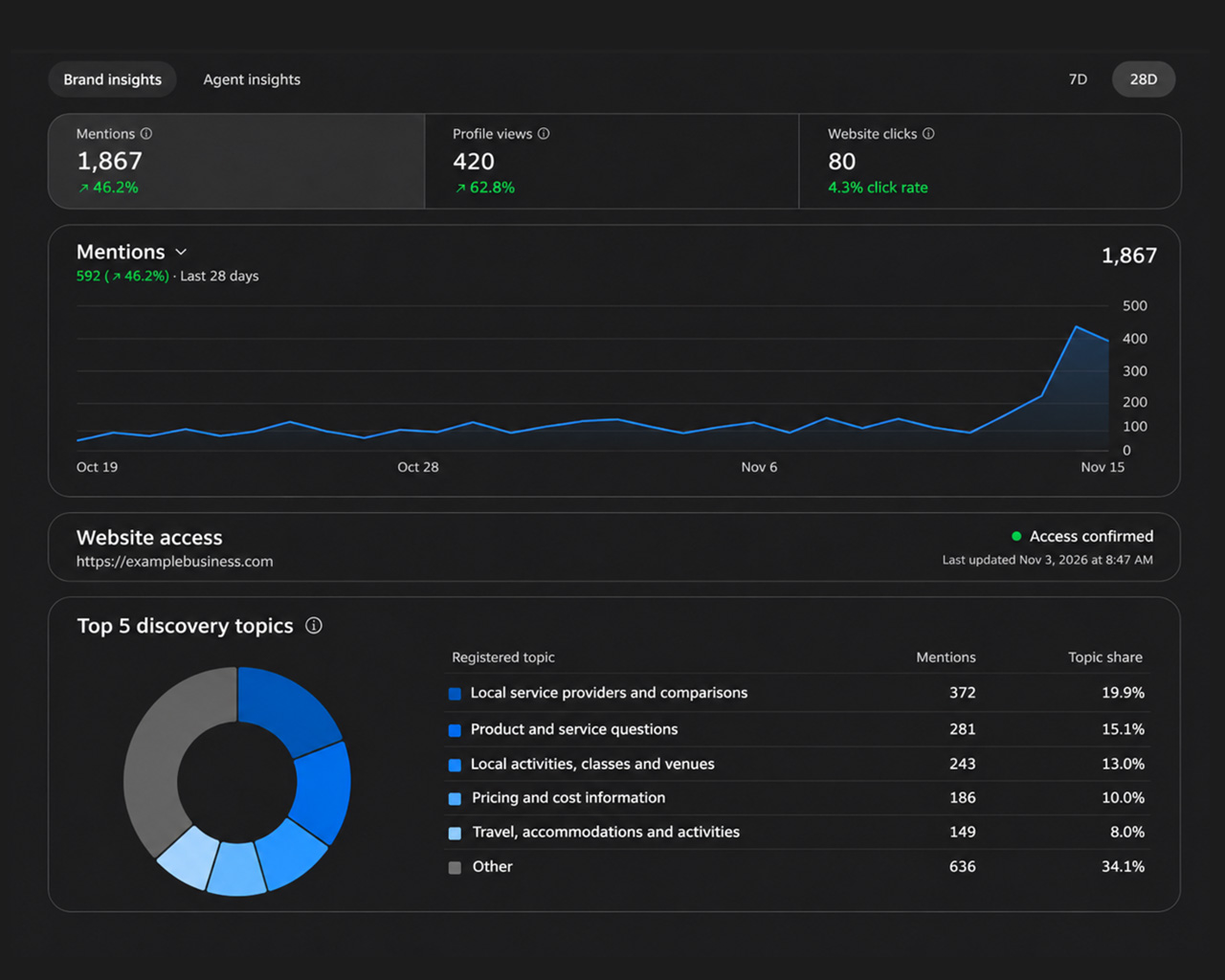
- See how people discover you, through a dashboard showing mentions, profile views, website clicks, and common discovery topics.
- Share product information, including pricing and availability, if you sell products and have a supported feed.
- Explore Business Agents, which can answer customer questions using information you provide. These are currently limited to eligible U.S. e-commerce and online service businesses.
You don’t need to buy ChatGPT ads to claim an eligible business. And claiming doesn’t guarantee you’ll rank higher in AI recommendations. The immediate benefit is having a way to manage your information instead of relying entirely on outside sources.
You Also Get a Dashboard, Similar to Google Business Profile
Here’s one of the more interesting additions. Once your claim and identity verification are approved, you can see a Brand insights dashboard. Think of it a little like the performance dashboard in Google Business Profile, but for activity happening inside ChatGPT.
It includes:
- Mentions: How often your business appears in supported ChatGPT results. A mention isn’t necessarily a visit or a lead.
- Profile views: How many times people open your business profile in ChatGPT.
- Website clicks: How often people click through from ChatGPT to your website.
- Discovery topics: The general subjects people are exploring when your business comes up. These can give you ideas about what customers associate with your business and what questions your content should answer.
You can also review recent trends instead of relying on a single total. Keep in mind that these are aggregated insights, not a list of individual customer conversations. Some details, including discovery topics, may only appear once there’s enough activity.
How to Claim Your Business
The initial process is pretty straightforward:
- Go to ChatGPT Business Hub and sign in to the ChatGPT account you’ll use to manage your business.
- Search for your business by name. If it’s already listed, select it. If you run an eligible online business and can’t find it, you may see an option to add it. For now, local stores and restaurants can only claim an existing U.S. listing.
- Review your business details. Depending on the setup flow, you’ll be asked to select your service or business category and provide a short description. Keep it clear. Tell people what you actually do, not just that you’re an “industry-leading solutions provider.”
- Verify that you represent the business. Use whichever option ChatGPT offers, such as a text message, automated phone call, business email, or a DNS record for your website domain. Eligible Shopify businesses may also see a store connection option.
- Complete the final identity check. After your claim is approved, OpenAI requires a separate identity check through Persona before you can publish updates, view insights, connect a product feed, or create a Business Agent. This may involve a government-issued ID and business documentation.
Easy enough to get started. Just don’t stop after the phone or domain verification and assume everything is done.
One Part We’re Not Entirely Sold On: Government ID Verification
There is one part of the process worth calling out. OpenAI requires you to complete identity verification through a third party, Persona, before you can edit and publish your business information or launch a Business Agent. To be clear, you can claim or create your listing, but making edits or using the agents functions requires this additional verification step. Depending on the verification flow, you may be asked for a government-issued ID, such as a driver’s license or passport, along with business records.
We understand why OpenAI wants to prevent people from claiming businesses they don’t own. But we’re not entirely comfortable with the idea of uploading a government ID just to manage a business listing, especially after you’ve already verified using a business phone number via phone/text, or via the domain in the form of adding a txt entry.
Let’s face it, many people’s ChatGPT accounts probably already contain a fair amount of personal information. But a government-issued ID feels like another level. To be clear, the identity check is handled by Persona, a third-party verification provider, not through the regular business profile form. Still, it’s sensitive information, and business owners should know what’s required before they decide to proceed.
You can review OpenAI’s verification instructions before submitting anything.
A Few Quick Tips
Make sure your business name, website, and contact details match what customers already see elsewhere online. Choose the category that best describes what you actually offer, and use the description to explain your services in plain English.
Once you’re approved, review your profile for accuracy, keep it updated, and check your insights to see how people are finding you. Also, remember that ChatGPT may continue using other sources in its answers, even after you’ve claimed your listing.
This isn’t a magic SEO shortcut, but it’s a simple opportunity to take more ownership of how your business is represented as people increasingly use AI to research products and services.
If you haven’t claimed your business yet, head over to Business Hub and take a look.
Need help? Let us know. We’re happy to point you in the right direction.
References: OpenAI’s Business Hub announcement and OpenAI’s official setup instructions.